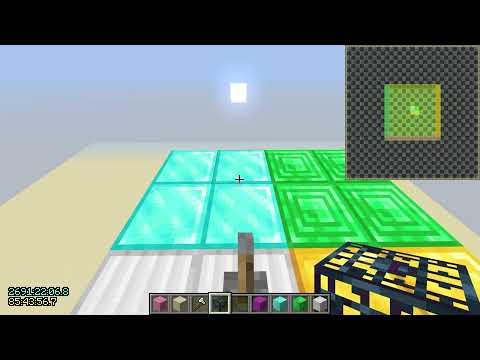
for now it has a setup guide and covers the ‘simple negative pie-ray’ from CrispLake and also a new ‘binary pie-ray’ which is an actually good version of ‘dank pie-ray’ which is what 70% of people need from the video really, though i am not releasing it till it is done.
if you have ideas to improve the video or pie-ray in general feel free to post them here. also i want to remove this tts voice, if you are interested in doing a voice over once the full video is done contact me as well otherwise i will have to switch to another tts voice.
i did make an attempt to make this video and after 4 days of work it’s 1/4 done and i’m already bored so i guess i’m doing the classic of procrastinate making the rest of it for another month or two. (also how do people make long videos do they all make them this slow or am i just bad)
after another long break if i still don’t feel like finishing this one i think i want to jump back to the stronghold project and hopefully put all the new ideas i’ve had into practice and make models for both classic and preemptive nav that gaps all human players. i can feel the project calling me! hopefully i learn to not work too hard this time…
rest of the video script which might contains some important information:
Sometimes you might not be able to get to the diagonal chunk in emerald very easily. In this case, the 'alternative hyper enhanced negative pie-ray' (it's such a bad name I wonder who named it) is also an option. Compared to 'binary pie-ray', the main difference is that instead of going straight to the diagonal chunk in emerald, you take two steps and check pie on both; because you get the information in those steps, you can lower render distance by 1 instead of 3.

1. To start, lower your render distance to 2. Refresh and check your pie chart to see if a spawner is within 5 chunks. Then raise your render distance by 4, so now you are at a render distance of 6. No spawner should load in. Slowly raise your render distance until a spawner loads in on the pie.

2. Lower your render distance by 1. The spawner shouldn't unload. Move 1 chunk forward, now you are in the chunk in diamond, then check your pie chart(refresh if you want). If the spawner unloads, it means that a spawner is in one of the chunks colored in magenta behind you.

3. If the spawner doesn't unload, Move 1 chunk to the right, now you are in the chunk in emerald. Check your pie chart(refresh if you want). If the spawner unloads, it means that a spawner is in one of the chunks colored in cyan to the left of you.

4. If the spawner doesn't unload, Move 1 chunk to the left, now you are in the chunk in diamond, then lower your render distance by 3. Check your pie chart(refresh if you want). If the spawner unloads, it means that a spawner is in one of the chunks colored in orange to the right of you; otherwise, it means that a spawner is in one of the chunks colored in brown in front of you.

The alternative version requires 3/1/2/3 moves for N/E/S/W cases; the original version of this pie-ray method lowers render distance in step 4 before moving to the left, which introduces a diagonal case that cannot be identified before the final step, making it 3/1/2/4(4 for diagonal). If you are a diagonal case enjoyer, you should not do this and do the last pie-ray method instead.

---

Before getting into that, let's introduce the old 'basic negative pie-ray' (credit Mar1n) first, which only uses negative pie-ray to identify far spawner cases and true diagonal cases.

1. To start, lower your render distance to 2. Refresh and check your pie chart to see if a spawner is within 5 chunks. Then raise your render distance by 4, so now you are at a render distance of 6. No spawner should load in. Slowly raise your render distance until a spawner loads in on the pie.

2. Lower your render distance by 4 to unload the spawner, then raise it by 3. Move 1 chunk forward, now you are in the chunk in diamond. Refresh and check your pie chart. If a spawner loads in on pie, it means that a spawner is in one of the chunk colored in brown in front of you.

3. If a spawner doesn't load, move 1 chunk to the right, now you are in the chunk in emerald. Refresh and heck your pie chart. If a spawner loads in on pie, it means that a spawner is in one of the chunk colored in orange to the right of you.

4. If a spawner doesn't load, raise your render distance by 1. Check your pie chart.

5.A1 If a spawner loads in on pie after step 4, it means that a spawner can either in one of the chunks in red far in front of you, or in blue far to the right of you, or in pink diagonally back right to you. Lower your render distance by 1(3 also works but that's just raw time loss). The spawner shouldn't load. Move 1 chunk to the left, now you are in the chunk in diamond, then check your pie chart(refresh if you want). If the spawner unloads, it means that a spawner is in one of the chunks colored in red.
5.A2 If the spawner doesn't unload, move 1 chunk backward, now you are in the chunk in iron. Check your pie chart(refresh if you want). If the spawner unloads, it means that a spawner is in one of the chunks colored in blue; otherwise, it means that a spawner is in the exact chunk colored in pink.

5.B If a spawner doesn't load after step 4, it means that a spawner can either in one of the chunks in cyan to the left of you or in magenta behind you. Move 1 chunk to the left, now you are in the chunk in diamond, then check your pie chart. If the spawner loads in, it means that a spawner is in one of the chunks colored in cyan to the left of you; otherwise, it means that a spawner is in one of the chunks colored in magenta behind you.

It requires 2/3/3/1(3 for north far spawner, 4 for west far spawner and diagonal) moves, so worse than the 3 methods above, and also requires more render distance change to setup; but I will show you a way to combine it with 'binary pie-ray' and 'alternative hyper enhanced negative pie-ray' to give you a minimal setup time in the later section.

---

Finally we have 'enhanced negative pie-ray'(credit CrispLake), which is basically 'hyper enhanced negative pie-ray' but lower render distance by 3 and not 1 in step 2, which results in 2 diagonal cases; combined with an additional step on half the cases, we can achieve an additional 2 diagonal cases, resulting a total of 4 diagonal cases for diagonal case enjoyers that value a diagonal case more than an extra move.

1. To start, lower your render distance to 2. Refresh and check your pie chart to see if a spawner is within 5 chunks. Then raise your render distance by 4, so now you are at a render distance of 6. No spawner should load in. Slowly raise your render distance until a spawner loads in on the pie.

2. Move 1 chunk forward, now you are in the chunk in diamond, then check your pie chart(refresh if you want). If the spawner unloads, it means that a spawner is in one of the chunks colored in magenta or yellow behind you.

3.A(optional) If the spawner unloads after step 2, move 1 chunk diagonally back right, now you are in the chunk in gold. Refresh and check your pie chart, if a spawner loads in, it means that a spawner is in one of the chunks colored in magenta; otherwise, it means that a spawner is in the exact chunk colored in yellow.

3.B1 If the spawner doesn't unload after step 2, Move 1 chunk to the right, now you are in the chunk in emerald. Check your pie chart(refresh if you want). If the spawner unloads, it means that a spawner is in one of the chunks colored in cyan to the left of you.

3.B2 If the spawner doesn't unload, lower render distance by 1. Check your pie chart(refresh if you want).

3.B2.a If the spawner unloads after step 3.B2, it means that a spawner is in one of the two chunks colored pink front left or white back right. Raise render distance by 3, then move 1 chunk to the left, now you are in the chunk in diamond. Refresh and check your pie chart. If a spawner loads in, it means that a spawner is in the exact chunk colored in pink; otherwise, it means that a spawner is in the exact chunk colored in white.

3.B2.b1 If the spawner doesn't unload after step 3.B2, move 1 chunk to the left, now you are in the chunk in diamond.  Check your pie chart(refresh if you want). If the spawner unloads, it means that a spawner is in one of the chunks colored in orange or purple to the right of you; otherwise, it means that a spawner is in one of the chunks colored in brown in front of you.

3.B2.b2(optional) If the spawner unloads, move 1 chunk diagonally back right, now you are in the chunk in gold. Refresh and check your pie chart, if a spawner loads in, it means that a spawner is in one of the chunks colored in orange; otherwise, it means that a spawner is in the exact chunk colored in purple.

This pie ray method with the additional check requires 4/2/2/3 moves for N/E/S/W cases(2/3/3/4 for the SE/SW/NE/NW diagonal cases). So is the deminishing chance of a diagonal case worth an extra move? Personally, I think not. From what I've seen, people struggle to deal with just 1 diagonal case, let alone 4; if you are such a mastermind that remembers all the cases and do it fast and accurately every time, it is still likely only worth it when the pie-ray is fully overlapped.

---

The showcase of all 5 pie-ray methods are done, now I'm going to explain a bunch of details for more advanced players. First I will go through a couple of more advanced things that can make your pie-ray more efficient, as well as why pie-ray might not bahave as you'd please in some cases; then I will dive into all the mechenics newly discovered for how the pie chart interacts with loaded block entities for pie-ray, and explain why all 4 of these new pie-ray methods that shouldn't work in conventional modeling turns out to work.

The radius(in Chebyshev distance) of entity ticking chunks(shown in lime) is (render distance - 1). For example, if you have your render distance at 8, then the lime entity ticking chunks can be as far as 7 chunks(in Chebyshev distance) away from the chunk you are in. The exception is when you set your render distance to 2 chunks, for the purpose of loading block entities it behaves the exact same as a render distance of 3 chunks. Knowing the exact distance of the spawner allows you to calculate one of the two coordnates along either the x or z axis, and you can do another pie-ray once you're there and get the coordnate for the other axis, so ideally you know exactly which chunk the spawner is in, which can help a lot if your fortress is buried.

I say ideally, because you can get fully baited by another spawner that is not the original spawner you were pie-raying, and there is nothing you can do about it. Take a look at this example, from the iron block we are pie-raying the spawner denoted with wither skeleton skull, which we get a reading that it is one of the chunks in brown. So we walk straight forward to the line of brown chunks, we pie-ray again, except this time the closest spawner to the player is actually a spawner denoted with normal skeleton skull. Now with the method people normally do for chunk counting, we will be locating a fake spawner denoted with creeper head that doesn't actually exist in the game at all, and there is nothing you can really do about it. The chance of something like this happening increases as the render distance you originally start pie-raying increases so this is more of a common issue in rsg than ranked, but it is still something to keep in mind regardless when you are chunk counting.

For all the newly introduced pie-ray methods, in order to avoid having to remember 20 numbers, the best chunk count method universally is honestly just use the chunk you originally started and the original render distance you load the spawner in, combined with the direction you get from the pie-ray.

Take chunk counting for 'simple negative pie-ray' for example. Here I start in the chunk 32,32 and I am facing west. (...)

Another thing that you should be aware of is you want to have the fortress generated before pie-raying, otherwise the spawner load might be delayed when you increase render distance, sometimes so delayed that it doesn't even happen until you raise render distance for another time, which will mess everything up. Furthermore, if you start your pie-ray at a render distance below 5, in very specific configurations you can get false positive results. So ideally, before starting your pie-ray, you should be at a render distance of at least 18 chunks in ranked or (4 + maximum amount of chunks you are willing to go for the spawner) in rsg.

Something that has been known to break the general rules of pie-raying is being near the spawn chunks. I haven't done enough experiments to document the exact behavior, but one thing I do know is that there it only takes lowering render distance 3 instead of 4 below the render distance that loads the spawner in to unload the spawner. The spawn chunk is relatively small so it should barely be an issue in the overworld (you should see the village if it is that close; the only real issue I can think of is pie-raying beehives), and spawn chunks do not exist in the nether or the end, so this is more of an issue for practicing. Just don't practice or experiment pie-ray near spawn chunks and you should be fine.

Speaking of practicing, I have the map that I used for visualizing pie-raying linked, which also contains a simple practice function. Each time you flick the lever, the old spawners will be replaced, and 2 spawners are placed randomly in the pie-ray-able reigon within 16 chunks of render distance of the chunk in iron. You should raise render distance back to at least 16 before flicking the lever, otherwise the spawners might not be able to be placed and the lever will be stuck. If that happens, simply exit and reopen the map, and flick the lever again at a render distance of at least 16.

If you unload a block entity by lowering render distance, it will not be properly removed from the list and will leave a ghost copy that cannot be removed when you break it, resulting in what's known as the treasure bug/spawner bug. To fix this, you have to exit the world and reopen. Ranked fixes this but very occasionally when I forgot to raise render distance to 16 in the practice map it still happens which I don't fully understand why.

In order to lower render distance with F3+F/Shift+F3+F more quickly, you can use jojoe's toolscreen to lower the key repeat delay. I use a minimal delay of 1ms, but there is an inherit delay, making it act more like a delay of around 20ms.

Next is the optimal pie-ray methods and positions for different bastions. (...)

Finally, let's talk about the way to "combine 'basic negative pie-ray' with 'binary pie-ray'/'alternative hyper enhanced negative pie-ray' to give you a minimal setup time" that I mentioned, which is mostly relevant for ranked. Notice that for 'basic negative pie-ray', the way you setup pie is that you want to raise render distance by 3 after unloading spawner with lowering render distance by 4, so ideally you want to collect the information of which render distance ring the spawner is in with lowering render distance to unloading the spawner; but for 'binary pie-ray'/'alternative hyper enhanced negative pie-ray', you want to lower render distance by 1 or 3 after loading the spawner, so ideally you want to collect the information of which render distance ring the spawner is in with raising render distance to loading the spawner. So instead of lowering render distance all the way to 2 then raise to 6 and have to raise render distance 12 times to reach 18 in the worse case, we can lower render distance to something like 8, then check the pie chart. If the spawner unloads, we instanly raise render distance by 3 to 11, the spawner should not load in; then worse case scenario, the spawner is 18 chunks away, you only have to raise render distance 7 times, then we lower render distance by 1 or 3 to immediately start a 'binary pie-ray'/'alternative hyper enhanced negative pie-ray'. If the spawner was not unloaded at the render distance of 8, we can instead slowly decrease render distance once each time, worst case scenario you have to lower render distance for 5 times to 3 to find out that the spawner is not pie-ray-able, or raise render distance by 3 after spawner unloads to immediately start a 'basic negative pie-ray'. To lower render distance to around 7~10 with tweaked key repeat delay will require a bit of practice, but once you master it this can save you around 2 seconds on average pie-raying.

---

The part that you need to understand as a player is finished, so you can skip to the end if you want. The following part is only really useful for developping new better pie-ray methods(which I doubt there are any left to be discovered) and nerds that want to understand everything.

You have already seen this graph that was shown next to the pie-ray method showcases, and can probably already tell what some parts of it means. Each blocks represents a chunk, and the spawner inside a chunk is loaded on pie if and only if the glass above it has a bright color(lime, yellow, orange and red); chunks that have gray or black stained glass above it does not have their spawner loaded on pie. The color above each chunk changes as the player with gold helmet moves and changes render distance under a certain rule set that has by far been believed to reflect what happens when you apply the same sequence of actions to your minecraft world.

In order to explain it easier, I will be describing things in the prospective of each chunk, and each action broken down to the smallest units. For example, instead of saying 'something will be done to these chunks in the x region when their relative Chebyshev distance to player changes up by 1', I will be saying 'each chunk with color X will do something when they find the player moving 1 chunk away from them'. This is not necessarily what is happening inside minecraft, the point is the effect is the same. This does cause some problems in some extreme cases, such as changing render distance directly in the settings menu(which, as far as I'm aware, has the same effect compared to changing render distance through F3+F/Shift+F3+F continuously) or pearling through multiple chunks(which most likely does not have the same effect compared to walking to that chunk), but for the purpose of pie-raying they should behave the same.

Before starting to explain what was newly discovered, we first need to understand what was already known. The rule set that was believed to be true can be described like this:

Let me break down what all of this means. First, +1 means the player is moving 1 chunk closer to the chunk in question; -1 means the player is moving 1 chunk away from the chunk in question; ↑1 means raising render distance by 1 and ↓1 means lowering render distance by 1.

When the player lowers render distance by 1(the case in the bottom right), previously red chunks turn black, previously orange chunks turn red, previously yellow chunks turn orange, and the outer layer of previously lime chunks, which I represent as lime wool in contrast to lime glass that is not on the outer layer, turn yellow.

For chunks that the player walks 1 chunk away from(the case in the top right), which is to say the Chebyshev distance between these chunks increased by 1 after the player's movement, the exact same thing was believed to be happening compared to the effect to those chunks when the player lowers render distance by 1.

When the player raises render distance by 1(the case in the bottom left), previously red chunks turn orange, previously orange chunks turn yellow, and chunks previously one layer outside of previously lime chunks, regarless of its previous color, which I represent as white wool, turn lime.

Similarly, for chunks that the player walks 1 chunk closer to(the case in the top left), which is to say the Chebyshev distance between these chunks decreased by 1 after the player's movement, the exact same thing was believed to be happening compared to the effect to those chunks when the player raises render distance by 1.

Also, when the render distance is set to n when the player load in, the (2n-1)x(2n-1) chunks centered around the player are lime, while all the other chunks are black.

With all the rules in place, we can determine exactly what color each chunk at any point in time. Let's see that in action with what was believed to be happening when you do a 'basic negative pie-ray'.

0. Before starting, let's assume you are at a render distance of 16, so all the chunks loaded on the board are lime.

1. To start, lower your render distance to 2. Refresh and check your pie chart to see if a spawner is within 5 chunks. Then raise your render distance by 4, so now you are at a render distance of 6. No spawner should load in since no black chunks had turned into a bright color. Slowly raise your render distance until a spawner loads in on the pie. When a spawner does load in on pie at a render distance, it means that at least one spawner is present in the newly loaded ring lime of chunks, and there are no spawners within that ring since if there is it should have loaded before raising render distance there. Note that this does not guarentee any information about spawner outside the outer ring of lime chunks.

2. Lower your render distance by 4 to unload the spawner. You can see the outer ring of lime chunks first turn yellow, then orange, then red, then black, exactly unloading it. Then raise it by 3, now the outer ring of lime chunks are just touching the ring that we know has a spawner in it. Move 1 chunk forward, now you are in the chunk in diamond. Refresh and check your pie chart. If a spawner loads in on pie, it means that a spawner is in one of the chunk colored in brown in front of you, which makes sense since they are the only chunks that just loaded in.

3. If a spawner doesn't load, move 1 chunk to the right, now you are in the chunk in emerald. Refresh and heck your pie chart. If a spawner loads in on pie, it means that a spawner is in one of the chunk colored in orange to the right of you. Again, makes sense.

4. If a spawner doesn't load, raise your render distance by 1. Check your pie chart. Since we did not have any information about whether there are any spawners outside the ring that we loaded in a spawner, there can very well be a spawner in the additional chunks loaded by raising render, which turns into an extra case that you have to deal with.

5.A1 If a spawner loads in on pie after step 4, it means that a spawner can either in one of the chunks in red far in front of you, or in blue far to the right of you, or in pink diagonally back right to you. Lower your render distance by 3. The spawner shouldn't load. Move 1 chunk to the left, now you are in the chunk in diamond, then check your pie chart(refresh if you want). If the spawner unloads, it means that a spawner is in one of the chunks colored in red.

5.A2 If the spawner doesn't unload, move 1 chunk backward, now you are in the chunk in iron. Check your pie chart(refresh if you want). If the spawner unloads, it means that a spawner is in one of the chunks colored in blue; otherwise, it means that a spawner is in the exact chunk colored in pink. It does deal with this case correctly.

5.B If a spawner doesn't load after step 4, it means that a spawner can either in one of the chunks in cyan to the left of you or in magenta behind you. Move 1 chunk to the left, now you are in the chunk in diamond, then check your pie chart. If the spawner loads in, it means that a spawner is in one of the chunks colored in cyan to the left of you; otherwise, it means that a spawner is in one of the chunks colored in magenta behind you.

The first thing that I discovered is when I do get a case that spawner is in red, I would walk back to emerald to chunk count normally, and I noticed that the spawner consistently reloads on pie after that, which was not predicted by this model. After a bunch of in game tests, I was able to determine that this is because of a mechanism that I name 'caching'.

Specifically, When you walk away from a chunk that was previously red(-1), it does not actually turn black, instead it turns gray, which is some sort of cache state that allows it to be reloaded when the player is further away: when you walk towards a chunk that was gray, it turns red; when you raise render distance, a chunk that was gray turns red as well, loading the spawner onto pie. When you lower render distance, all gray chunks turn black, so you don't have to worry about them messing up your pie-ray since the first step is always lower render distance; however, if you were not on a render distance that can load the spawner when you originally start the pie-ray, the distance measured by raising render distance directly from there can get messed up by this mechanism, so it is just an extra reason to have the render distance high up when you start the pie-ray.

Another thing that I found out by accident when testing different cases for the previous discovery is that when you walk away from a chunk that was previously yellow, it directly turns black instead of orange! The first thing that I found this useful for is for the diagonal spike in basic negative pie-ray, if you don't walk back to the original chunk like I used to do for chunk counting, you can just lower render distance by 1 instead of 3:

5.A1 If a spawner loads in on pie after step 4, it means that a spawner can either in one of the chunks in red far in front of you, or in blue far to the right of you, or in pink diagonally back right to you. Lower your render distance by 3. The spawner shouldn't load. Move 1 chunk to the left, now you are in the chunk in diamond, then check your pie chart(refresh if you want). If the spawner unloads, it means that a spawner is in one of the chunks colored in red.

But then I realized that these two discoveries can do far more than that, hence the video you see today.

---

Credits:
The concept of pie-ray was originally discovered by kemytz. PandapigGamer (maybe discovered and?) made the first showcase video of the original pie-ray method. Lathil (maybe discovered and?) made the first showcase video of a pie-ray method ("the modern pie-ray") that only uses a corner of a chunk and the original pie-ray visualizer on itch.io . Mar1n (maybe discovered and?) made the first showcase video(?) of a pie-ray method that covers all the cases while still only using a corner of a chunk("negative pie ray"). CrispLake discovered (and made a showcase video of) a pie-ray method that only uses negative pie-ray to eliminate far spawner cases.

Before ending, let's see 2 legacy pie-ray methods. The first one is the first ever pie-ray method, where you go all 4 chunks adjacent the starting chunk:

1. Setup pie the same way as modern pie-ray so your lime chunks are just shy of touching the closest ring of chunks that loads in the spawner.

2. Move 1 chunk forward into diamond, a spawner is in brown if spawner loads, otherwise move 1 chunk backward into iron.
3. Move 1 chunk to the right into gold, a spawner is in orange if spawner loads, otherwise move 1 chunk to the left into iron.
4. Move 1 chunk backward into lapis, a spawner is in magenta if spawner loads, otherwise move 1 chunk forward into iron.
5. Move 1 chunk to the left into redstone, a spawner is in cyan if spawner loads.

Obviously this is taking a very long time, which is the original motivation that people wanted to find a better pie-ray method; but also, all 4 diagonals cases are not covered in this method, even you can in fact check diagonal chunks to your starting chunk like emerald, it makes an already slow pie-ray method even slower.

The second one is the old stables gap pie-ray, which is still used by people to this day which you should definitely switch to the 'simple negative pie-ray' because it is not full-proof for all cases. The method goes:

1. Setup pie the same way as modern pie-ray so your lime chunks are just shy of touching the closest ring of chunks that loads in the spawner.

2. Move 1 chunk forward into diamond, a spawner is in brown if spawner loads, otherwise raise render distance by 1. We know that there is at least 1 spawner within cyan, red, pink and orange if spawner loads; Otherwise, we immediately know that a spawner is magenta or white since we know from the ring that there is at least one spawner in cyan, brown, pink, orange, magenta and white, and we know that it is not in brown. Note that if there is another spawner in cyan, red, pink and orange, you cannot get this information since spawner is still loaded.

3. Move 1 chunk backwards into iron, then lower render distance by 4 and raise by 3. Every spawner is now unloaded. Move 1 chunk to the right into gold, a spawner is in orange if spawner loads. Raise render distance by 1. If spawner is not loaded, everything is chill and we now know from the ring that a spawner is in cyan or white. The problem arises when a spawner is loaded in this case. As a simple example, there is no way for you to know whether there is a single spawner in pink, or there is two spawners, one in magenta and one in white, which you can quickly verify by comparing the case when there is a single spawner denoted in wither skeleton skull and two spawners denoted in normal skeletom skulls. There are other cases that it breaks which I will not list here.

Thanks for watching.
tts voice is from: link