the superstrike came out a few months ago and is the first mouse (that im aware of) to feature analog switches. similar to a wooting keyboard, this means the superstrike has adjustable switch actuation and a rapid trigger setting. you would think this should mean that the superstrke can get super high clicks per second, right?
i used it for a few weeks and it did feel nice (ill talk more about that later) but i just wasn’t able to get a very high cps with it compared to my op1. boat clutches weren’t as consistent, and i just wasn’t able to airplace at all. i was using the shortest actuation and rapid trigger settings (both set to 1) so the only other thing i thought might be holding me back was my physical technique. i kept using it for a couple weeks but nothing changed, and i eventually switched back to the op1 purely because of the shape. i was still curious why i wasn’t able to get high cps with the superstrike though so i decided to finally do some objective testing
testing
for each test, i did about ten minutes of nether portal practice on the vine seed practice map (in 1.16.1) while primarily drag clicking. i used the speedrun-legal minecraft mod MCSR Fairplay’s input logs to get an extremely precise time of each individual mouse click. i tested a few different combinations of settings with the superstrike, and also tested the op1 as a baseline with default multiclick filtering and spdt safe mode. for all testing here im only looking at right click
the main thing i care about is clicks per second, so the first thing i looked at was the time in between each click, and here are those results, comparing the op1 and the superstrike with my preferred settings (1 actuation, 1 rapid trigger, 0/off haptics):
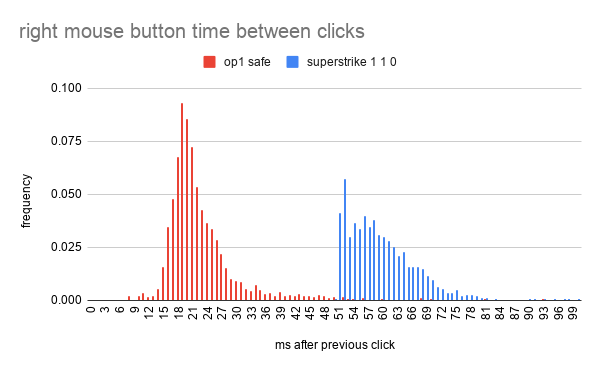
the x axis is the time in milliseconds between two clicks, and the y axis is the frequency of that time in each dataset (2671 and 3659 clicks respectively, so i made the chart show proportions instead of just the count). so for the op1 you can see around 9% of clicks happen around 19 ms after the previous click. for the superstrike, you can see a wall at exactly 51 ms, with practically no clicks happening any sooner than exactly 51 ms after the previous click
im bad at making graphs and this one looks really bad if i try and put more than two datasets on it, so ill just say in text that none of the settings made a meaningful difference in this data. i tested actuation settings 1 and 5, each with rapid trigger set to either 1 or disabled, all with haptics off. i also tested actuation 1, rapid trigger 1, haptics 1. all 5 of these combinations have very similar looking graphs, all featuring a wall at 51 ms
if it wasn’t obvious, this is really bad if you care about clicking fast. it also explains why i couldn’t airplace, its literally impossible with the superstrike (if my understanding of airplace is correct). even though in theory you could click at (1000 / 51) or 19.6 cps with the superstrike, in practice unless you’re perfectly timing your clicks to be spaced out by exactly 51 ms, you’re going to struggle to get more than around 16 cps even with drag, since any clicks that come in before that 51 ms lockout will just be dropped
i also looked at click hold times, or the time between each button press and release, so here’s that:
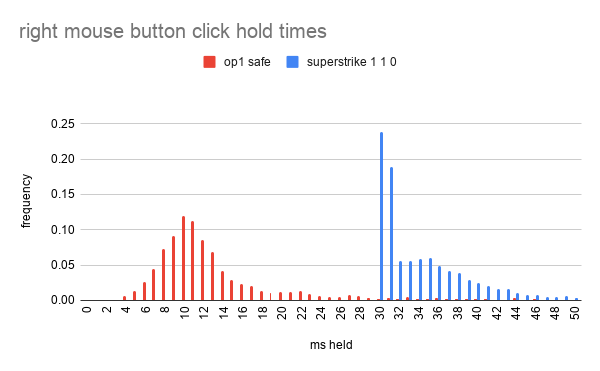
you can see here that the vast majority of clicks from the superstrike, over 40%, are held for 30 ms or 31 ms, while the op1 has a nice normal distribution of hold times as you would expect. these hold times tell a similar story to the times between clicks, but the specific reason i wanted to look at this is because someone made a reddit post a few months ago documenting this same “30ms click floor”, which confirms that i don’t just have a faulty unit or bad testing or something. link to that post: https://www.reddit.com/r/LogitechG/comments/1r5wxgg/logitech_superstrike_revolutionary_hits_but_a/
this concludes the testing and data section, but i do have a bit to say about my subjective experience with this mouse and its actually quite positive
my subjective review
curiosity got the best of me and i bought this mouse a couple months ago and used it for a couple weeks. as i said before, i used the shortest actuation setting (1) and the shortest rapid trigger setting (1), with haptics disabled. these are pretty extreme settings and take some getting used to, but i think its how you can really get the most out of this mouse. the clicks felt really nice for most gameplay, and it felt like i was able to quickly normal click far more consistently and with less effort than with a normal mouse. things like portals, bastion block placements, zero cycling, fast looting, and more all just felt really nice to do
one draw back was that it was annoying to click and hold, since if you release even a little bit, using rapid trigger means that it will release the click. in practice this means you basically have to bottom out the mouse if you’re doing something like punching a tree. crafting a boat and doors was also pretty uncomfortable. you could use less aggressive settings than i did, but i feel like that kinda defeats the purpose of this mouse and noticeably makes the clicks feel heavier and slower. there are a couple other solutions, like you could swap left and right click in menus or gameplay. most of the time when you need to hold click its left click in normal gameplay, but right click in menus, so if you swapped one of them you could maybe get away with only having a short actuation or rapid trigger on only one mouse button. you could also maybe just put a shim under the mouse button to shorten the total travel and make it feel less bad to bottom out, but i haven’t tried that
i did generally enjoy my time using the superstrike though. it took a few days to get used to (and i misinput a lot during those days) but once i got comfortable i did legitimately feel like it let me play better in most situations. since it requires such a minuscule physical effort to click, you don’t have to tense your finger or hand almost at all. it feels far easier to click and release with super precise timing even at higher normal click cps of around 8 or 9. one case in game that’s super noticeably way easier and faster with the superstrike was a buried second portal with gold pick. if you single click to mine out a precise area for the portal, the faster you click, the harder it gets to release each click fast enough to avoid mining an extra netherrack. or if you’re trying to be flashy and have obby in offhand so you can left+right to mine and place the obby in a single tick, its very easy to click a tick early or late on one mouse button, which can cause you to misplace. with the superstrike though, the difficulty of these precise timings evaporated, i think mainly because rapid trigger makes it so much easier to click for a short duration (at least down to 30 ms). similarly, i felt like i ghost bucketed a lot less mainly with lava pool portals, i think since it was a lot easier to precisely time a click at the perfect point mid flick
conclusion
overall, if i were able to take the switches from the superstrike and put them on my op1, even with the downside of massively limiting my cps, i think i would, at least for some stuff. in categories like ssg where you don’t actually need to hit 20 cps for anything, its really not bad. dragging for portals on vine seed for example feels quite good, even better than the op1 depending on how my drags are feeling in the moment. i was also able to telly bridge with the superstrike just as well with my op1 (though im terrible at telly so maybe take this with a grain of salt). unfortunately actually maining the superstrike is just a nonstarter for me purely because of the shape. i use a fingertip grip and the op1 is just so much more comfortable for me by such a wide margin that the differences in the clicks don’t matter at all. it also doesn’t help the superstrike’s case that the op1 does actually has extremely nice clicking and much better high cps performance. if you mainly play rsg or ranked, the superstrike means you will be worse at boat clutching and not be able to airplace at all, which will absolutely be a deal breaker for many runners
in theory it might be possible that logitech could fix the issues with the superstrike with a software or firmware update. it seems most likely that the 51 or 30 ms wall was intentionally added to prevent accidental double clicks, and i would love to see some update that allowed users to configure it, though im not holding my breath
sorry for the poor quality of this post, im busy with other things but wanted to finally get this info out. let me know if you want me to test anything with the superstrike, or if you have any questions